Its always a tedious task to set path in java every time we restart our pc. Here is how to do that once so that u don't need to do this boring process again.
Steps :
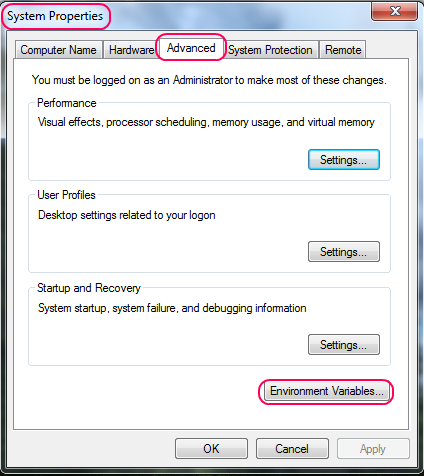
1) Go to System Properties (Shortcut : Press Windows Key + Pause Break).
2) Now Go to "Advanced" Tab.
3) Click on Environment Variables... (See Image Below,Click to Enlarge ) .
4) Under "System Variables" scroll to "Path" and click "Edit".
5) Now what is present in that leave it as it is ( Don't delete any thing but just add after that) and add the following which is in quotes(without quotes) {As shown in image} :
";C:\Program Files\Java\jdk1.6.0\bin"
6)Note:Replace the above line with your path of jdk but add a semicolon first as i have done above
7)Click Ok,Again Ok,Again OK.
You are done.....
Showing posts with label Programming. Show all posts
Sunday, June 13, 2010
Saturday, May 22, 2010
Java : Adding 'Compile Program' Option to Context Menu for Java Files
Java programmers & students always find it a tedious process to open command prompt,set path & then compile the program.Here's how to get a compile program option in Context Menu so that we can compile from right click & know the errors in the program.
* Start Notepad & type the following (Note:Replace "c:\program files\java\jdk1.6.0\bin" with your path of JDK).
@echo off
* Save this file as "compile.bat" & copy this file in c:\windows.
* Open registry editor : Press Winkey + R(Run) & type "regedit.exe".
* Goto "HKEY_CLASSES_ROOT\java_auto_file\shell"
* Right Click on "shell" key & choose New - Key.
* Type Key name "compile".
* In right side pane double click on Default & type "Compile Program" & click OK.
* Now right click on "compile" key & click New - Key.
* Type key name as : "command" (without quotes).
* Click On command & in right side pane double click on Default & type : C:\Windows\compile.bat "%1"
* U get the Compile Program option for java files.
* Restart UR Pc
* Have fun..........
Shortcut to Do this :
For some reason if you are unable to do the above process.Perform steps 1 & 2 & then download this zip file & double click on reg file in it to add keys to registry for u.
* Start Notepad & type the following (Note:Replace "c:\program files\java\jdk1.6.0\bin" with your path of JDK).
@echo off
path=%PATH%;C:\Program files\Java\jdk1.6.0\bin
javac "%1"
pause
* Open registry editor : Press Winkey + R(Run) & type "regedit.exe".
* Goto "HKEY_CLASSES_ROOT\java_auto_file\shell"
* Right Click on "shell" key & choose New - Key.
* Type Key name "compile".
* In right side pane double click on Default & type "Compile Program" & click OK.
* Now right click on "compile" key & click New - Key.
* Type key name as : "command" (without quotes).
* Click On command & in right side pane double click on Default & type : C:\Windows\compile.bat "%1"
* U get the Compile Program option for java files.
* Restart UR Pc
* Have fun..........
Shortcut to Do this :
For some reason if you are unable to do the above process.Perform steps 1 & 2 & then download this zip file & double click on reg file in it to add keys to registry for u.
Subscribe to:
Posts (Atom)


